안 쓰는 모듈 정리를 위해
npx depcheck 명령어 실행 후, uninstall을 진행했다.
사용하지 않는 모듈 확인
npx depcheck
파일 패키지에서 모듈 삭제
npm uninstall <module_name> --save
npm uninstall 시, 다음과 같은 에러가 발생했다.
보통 npm install 또는 uninstall 시 이런 에러가 발생하는 것 같다.
1. npm 종속성 에러

에러메시지를 읽어보면, dependency 관련 오류임을 알 수 있다.
2. 해결방법
1. Overrides 추가
아래의 Stack Overflow 글을 참고했는데,
overrides를 추가해주는 게 좋은 방법이라고 했다.
javascript - Fix the upstream dependency conflict installing NPM packages - Stack Overflow
Fix the upstream dependency conflict installing NPM packages
I am trying to npm install vue-mapbox mapbox-gl, and I'm getting a dependency tree error. I'm running Nuxt.js SSR with Vuetify and haven't installed anything related to Mapbox prior to running this
stackoverflow.com
npm docs를 참고하여, package.json에서 overrides에 사용하고자 하는 npm 모듈 버전을 명시했다.
package.json | npm Docs
Specifics of npm's package.json handling
docs.npmjs.com
적용법:
  "overrides": {
    "@thatopen/components": "2.4.3",
    "@thatopen/components-front": "2.4.3",
    "@thatopen/fragments": "2.4.0",
    "@thatopen/ui": "2.4.1",
    "@thatopen/ui-obc": "2.4.1"
  },
<그 외 쉽고 빠르지만 에러를 발생시킬 수 있는 2가지 방법>
$ npm install --force
$ npm install --save --legacy-peer-deps이런 방법도 있다고는 했는데, 위 방법이 더 좋은 것 같다.
--force 옵션의 경우 package-lock.json에 다른 dependency 버전을 추가하는 것이다. 충돌하는 peer dependency들을 루트 프로젝트에 설치하여 에러를 해결한다.
--legacy-peer-deps 옵션의 경우 peer dependency가 맞지 않아도 일단 설치하는 것으로, --force를 먼저 실행시켜본 후, 해결되지 않으면 --legacy-peer-deps 옵션으로 실행시켜보는 게 좋을 것 같다.
2. 캐시 제거
npm cache clean 명령어를 입력하니, 다음과 같은 오류가 발생했다.
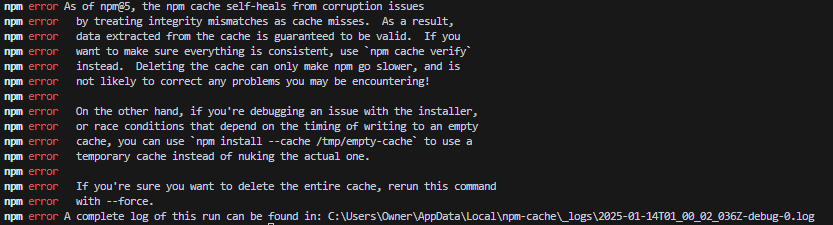
그래서
npm cache verify명령어를 사용했다.
실행 후 cmd창이다.

npm 업데이트는 굳이 안했다.
3. ncu -u
ncu -u 명령어로 현재 프로젝트의 package.json에 적혀 있는 의존성(dependency) 버전을 최신 버전으로 업데이트해줬다.
npm-check-updates 패키지를 사용하는 명령어이다.
4. npm uninstall 수행
npm uninstall <module_name> --save이 명령어로 모듈 삭제를 진행했다.

여전히 이런 에러가 발생했다..
dependencies에 선언된 모듈의 버전을 overrides에 명시하면 오류가 생기는 것 같았다.
그래서 dependencies에서 해당 모듈들을 제거한 후 다시
npm cache verify 명령어를 실행했다.
그 후 npm uninstall을 다시 진행했다.
아래와 같이 경고가 나왔다..
npm warn ERESOLVE overriding peer dependency
npm warn While resolving: bim-app@0.0.0
npm warn Found: eslint@8.57.0
npm warn node_modules/eslint
npm warn   peer eslint@"^6.0.0 || ^7.0.0 || >=8.0.0" from @eslint-community/eslint-utils@4.4.0
npm warn   node_modules/@eslint-community/eslint-utils
npm warn     @eslint-community/eslint-utils@"^4.2.0" from eslint@8.57.0
npm warn   7 more (eslint-config-airbnb-base, eslint-config-prettier, ...)
npm warn
npm warn Could not resolve dependency:
npm warn peer eslint@"^7.32.0 || ^8.2.0" from eslint-config-airbnb-base@15.0.0
npm warn node_modules/eslint-config-airbnb-base
npm warn   dev eslint-config-airbnb-base@"15.0.0" from the root project
npm warn ERESOLVE overriding peer dependency
npm warn While resolving: bim-app@0.0.0
npm warn Found: eslint@8.57.0
npm warn node_modules/eslint
npm warn   peer eslint@"^6.0.0 || ^7.0.0 || >=8.0.0" from @eslint-community/eslint-utils@4.4.0
npm warn   node_modules/@eslint-community/eslint-utils
npm warn     @eslint-community/eslint-utils@"^4.2.0" from eslint@8.57.0
npm warn   7 more (eslint-config-airbnb-base, eslint-config-prettier, ...)
npm warn
npm warn Could not resolve dependency:
npm warn peer eslint@"^2 || ^3 || ^4 || ^5 || ^6 || ^7.2.0 || ^8" from eslint-plugin-import@2.29.1
npm warn node_modules/eslint-plugin-import
npm warn   peer eslint-plugin-import@"^2.25.2" from eslint-config-airbnb-base@15.0.0
npm warn   node_modules/eslint-config-airbnb-base
npm warn   1 more (the root project)
npm warn ERESOLVE overriding peer dependency
npm warn ERESOLVE overriding peer dependency
npm warn While resolving: @thatopen/components@2.2.12
npm warn Found: three@0.172.0
npm warn node_modules/three
npm warn   peer three@"^0.160.1" from @thatopen/fragments@2.4.0
npm warn   node_modules/@thatopen/fragments
npm warn     peer overridden @thatopen/fragments@"2.4.0" (was "~2.2.0") from @thatopen/components@2.2.12
npm warn     node_modules/@thatopen/components
npm warn     1 more (@thatopen/components-front)
npm warn
npm warn Could not resolve dependency:
npm warn peer three@"^0.160.1" from @thatopen/components@2.2.12
npm warn node_modules/@thatopen/components
npm warn
npm warn Conflicting peer dependency: three@0.160.1
npm warn node_modules/three
npm warn   peer three@"^0.160.1" from @thatopen/fragments@2.4.0
npm warn   node_modules/@thatopen/fragments
npm warn     peer overridden @thatopen/fragments@"2.4.0" (was "~2.2.0") from @thatopen/components@2.2.12
npm warn     node_modules/@thatopen/components
npm warn     1 more (@thatopen/components-front)
npm warn ERESOLVE overriding peer dependency
npm warn While resolving: @thatopen/components@2.2.12
npm warn Found: web-ifc@0.0.66
npm warn node_modules/web-ifc
npm warn   web-ifc@"0.0.66" from the root project
npm warn
npm warn Could not resolve dependency:
npm warn peer web-ifc@"0.0.57" from @thatopen/components@2.2.12
npm warn node_modules/@thatopen/components
npm warn
npm warn Conflicting peer dependency: web-ifc@0.0.57
npm warn node_modules/web-ifc
npm warn   peer web-ifc@"0.0.57" from @thatopen/components@2.2.12
npm warn   node_modules/@thatopen/components
npm warn ERESOLVE overriding peer dependency
npm warn ERESOLVE overriding peer dependency
npm warn ERESOLVE overriding peer dependency
npm warn While resolving: @thatopen/components-front@2.2.2
npm warn Found: three@0.172.0
npm warn node_modules/three
npm warn   peer three@"^0.160.1" from @thatopen/fragments@2.4.0
npm warn   node_modules/@thatopen/fragments
npm warn     peer overridden @thatopen/fragments@"2.4.0" (was "~2.2.0") from @thatopen/components@2.2.12
npm warn     node_modules/@thatopen/components
npm warn     1 more (@thatopen/components-front)
npm warn
npm warn Could not resolve dependency:
npm warn peer three@"^0.160.1" from @thatopen/components-front@2.2.2
npm warn node_modules/@thatopen/components-front
npm warn
npm warn Conflicting peer dependency: three@0.160.1
npm warn node_modules/three
npm warn   peer three@"^0.160.1" from @thatopen/components-front@2.2.2
npm warn   node_modules/@thatopen/components-front
npm warn ERESOLVE overriding peer dependency
npm warn While resolving: @thatopen/components-front@2.2.2
npm warn Found: web-ifc@0.0.66
npm warn node_modules/web-ifc
npm warn   web-ifc@"0.0.66" from the root project
npm warn
npm warn Could not resolve dependency:
npm warn peer web-ifc@"0.0.57" from @thatopen/components-front@2.2.2
npm warn node_modules/@thatopen/components-front
npm warn
npm warn Conflicting peer dependency: web-ifc@0.0.57
npm warn node_modules/web-ifc
npm warn   peer web-ifc@"0.0.57" from @thatopen/components-front@2.2.2
npm warn   node_modules/@thatopen/components-front
npm warn ERESOLVE overriding peer dependency
npm warn ERESOLVE overriding peer dependency
npm warn ERESOLVE overriding peer dependency
npm warn While resolving: @thatopen/ui-obc@2.2.5
npm warn Found: three@0.172.0
npm warn node_modules/three
npm warn   peer three@"^0.160.1" from @thatopen/fragments@2.4.0
npm warn   node_modules/@thatopen/fragments
npm warn     peer overridden @thatopen/fragments@"2.4.0" (was "~2.2.0") from @thatopen/components@2.2.12
npm warn     node_modules/@thatopen/components
npm warn     1 more (@thatopen/components-front)
npm warn
npm warn Could not resolve dependency:
npm warn peer three@"0.160.1" from @thatopen/ui-obc@2.2.5
npm warn node_modules/@thatopen/ui-obc
npm warn
npm warn Conflicting peer dependency: three@0.160.1
npm warn node_modules/three
npm warn   peer three@"^0.160.1" from @thatopen/components@2.4.3
npm warn   node_modules/@thatopen/components
npm warn     peer overridden @thatopen/components@"2.4.3" (was "~2.2.0") from @thatopen/ui-obc@2.2.5
npm warn     node_modules/@thatopen/ui-obc
npm warn     1 more (@thatopen/components-front)
npm warn ERESOLVE overriding peer dependency
npm warn While resolving: @thatopen/ui-obc@2.2.5
npm warn Found: web-ifc@0.0.66
npm warn node_modules/web-ifc
npm warn   web-ifc@"0.0.66" from the root project
npm warn
npm warn Could not resolve dependency:
npm warn peer web-ifc@"0.0.57" from @thatopen/ui-obc@2.2.5
npm warn node_modules/@thatopen/ui-obc
npm warn
npm warn Conflicting peer dependency: web-ifc@0.0.57
npm warn node_modules/web-ifc
npm warn   peer web-ifc@"0.0.57" from @thatopen/ui-obc@2.2.5
npm warn   node_modules/@thatopen/ui-obc

added 20 packages, removed 111 packages, changed 64 packages, and audited 560 packages in 2m

154 packages are looking for funding
  run `npm fund` for details

found 0 vulnerabilities
---
보통 이렇게 하면 해결된다는데..
npm run dev 시 다음과 같은 오류 발생했다.
Re-optimizing dependencies because lockfile has changed
--
그래서
최종 해결방법
1, package-lock.json 파일 삭제
rm -rf package-lock.json
2. node_modules 폴더 삭제
rm -rf node_modules
3. npm 설치
npm install
4. npm run dev
실행 후 정상 작동하는지 확인
이렇게 수행하니깐 잘 동작했다.