kotlin 언어
Android Studio 사용
data binding을 하면 보다 쉽고, 빠르게 코드를 짤 수 있다.
기본적으로 해야 할 것.
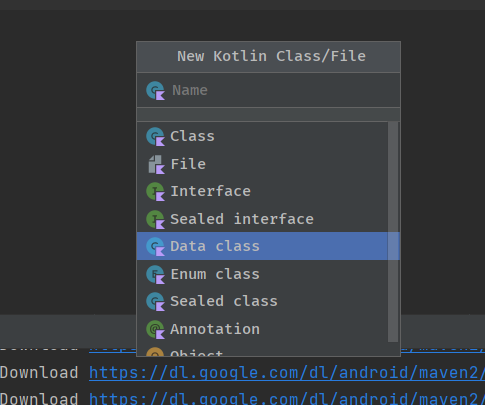
1. kotlin class > data file 만들어줌.
2. build.gradle (:app)에 아래 코드 추가
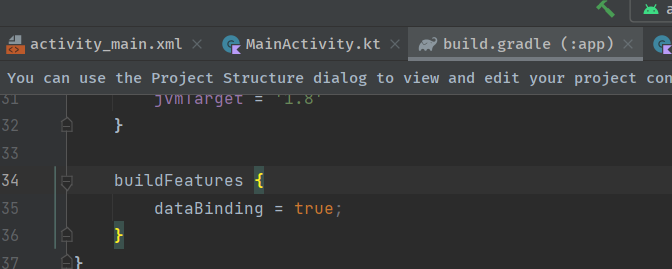
코드
MainActivity.kt
package com.example.livedata

import androidx.appcompat.app.AppCompatActivity
import android.os.Bundle
import android.widget.Button
import android.widget.TextView
import androidx.lifecycle.MutableLiveData
import com.example.livedata.databinding.ActivityMainBinding

class MainActivity : AppCompatActivity() {

    private lateinit var binding : ActivityMainBinding

    override fun onCreate(savedInstanceState: Bundle?) {
        super.onCreate(savedInstanceState)

        binding = ActivityMainBinding.inflate(layoutInflater)
        setContentView(binding.root)

        val count : MutableLiveData<Int> = MutableLiveData(0)

        count.observe(this, {
            binding.txtView.text = count.value.toString()
        })

        binding.button.setOnClickListener{
            count.value?.let{ //
                count.value = it + 1
            }
        }

    }

}
activity_main.xml
<?xml version="1.0" encoding="utf-8"?>
<androidx.constraintlayout.widget.ConstraintLayout xmlns:android="http://schemas.android.com/apk/res/android"
    xmlns:app="http://schemas.android.com/apk/res-auto"
    xmlns:tools="http://schemas.android.com/tools"
    android:layout_width="match_parent"
    android:layout_height="match_parent"
    tools:context=".MainActivity">

    <TextView
        android:id="@+id/txtView"
        android:layout_width="191dp"
        android:layout_height="120dp"
        android:text="Hello World!"
        android:textSize="34sp"
        app:layout_constraintBottom_toBottomOf="parent"
        app:layout_constraintEnd_toEndOf="parent"
        app:layout_constraintStart_toStartOf="parent"
        app:layout_constraintTop_toTopOf="parent"
        app:layout_constraintVertical_bias="0.453" />

    <Button
        android:id="@+id/button"
        android:layout_width="127dp"
        android:layout_height="58dp"
        android:layout_marginTop="72dp"
        android:text="Button"
        app:layout_constraintEnd_toEndOf="parent"
        app:layout_constraintHorizontal_bias="0.531"
        app:layout_constraintStart_toStartOf="parent"
        app:layout_constraintTop_toBottomOf="@+id/txtView" />

</androidx.constraintlayout.widget.ConstraintLayout>
build.gradle(: app)
plugins {
    id 'com.android.application'
    id 'org.jetbrains.kotlin.android'
}

android {
    namespace 'com.example.livedata'
    compileSdk 33

    defaultConfig {
        applicationId "com.example.livedata"
        minSdk 24
        targetSdk 33
        versionCode 1
        versionName "1.0"

        testInstrumentationRunner "androidx.test.runner.AndroidJUnitRunner"
    }

    buildTypes {
        release {
            minifyEnabled false
            proguardFiles getDefaultProguardFile('proguard-android-optimize.txt'), 'proguard-rules.pro'
        }
    }
    compileOptions {
        sourceCompatibility JavaVersion.VERSION_1_8
        targetCompatibility JavaVersion.VERSION_1_8
    }
    kotlinOptions {
        jvmTarget = '1.8'
    }

    buildFeatures {
        viewBinding = true
    }
}

dependencies {

    implementation 'androidx.core:core-ktx:1.7.0'
    implementation 'androidx.appcompat:appcompat:1.6.1'
    implementation 'com.google.android.material:material:1.8.0'
    implementation 'androidx.constraintlayout:constraintlayout:2.1.4'
    testImplementation 'junit:junit:4.13.2'
    androidTestImplementation 'androidx.test.ext:junit:1.1.5'
    androidTestImplementation 'androidx.test.espresso:espresso-core:3.5.1'
}
'수업' 카테고리의 다른 글
| 웹프로그래밍 - 자바스크립트 javascript 기초 (0) | 2023.04.04 |
|---|---|
| 모바일프로그래밍 - Fragment_Navigation(모바일 앱에서 화면 전환) (0) | 2023.04.04 |
| android studio / kotlin 기본. 버튼 클릭시 숫자 1증가하는 앱 (0) | 2023.04.03 |
| 웹프로그래밍 - 4-2. flexbox 아이템에 적용하는 속성들 (0) | 2023.04.03 |
| 웹프로그래밍 - 4-2 flexbox 컨테이너에 적용하는 속성들 (0) | 2023.04.03 |